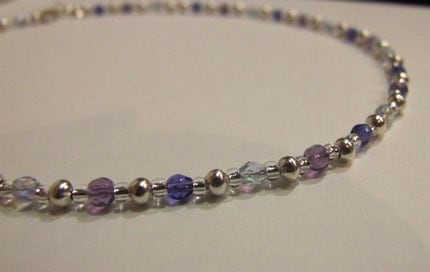
Just a quick post as I've been working hard on updating my website and trying to collect my site, my store and my blog all in one place and giving them a cohesive look. I'm very happy with the way it's going but I'm not done yet so I need to get back to it.
However, I discovered this little trick while I was working on the html behind my Storenvy store and I thought you might want to know.
Pinterest allows you to add a button to your website to encourage people to pin what they find there. Obviously if you are an online seller its a great idea to have a button next to all your products and you can do that through this Pinterest page (scroll down to the ' "Pin It" Button for Websites' section)
However, you will quickly notice that if you use that page you are required to type the URL of the product page and the product image - this means you would have to make a button for each and every one of your products. Not only would that be time consuming, you don't actually have access to the html for individual product pages on Storenvy.
But you can still add a Pinterest button and the good news is that you only need to make the button once!
You need to edit the html directly of your "Product" page.
Find the section that looks like this:
Then copy and paste this section of code directly after it:
It should end up looking like this:
This site has moved! Old posts will remain here but new posts will be at www.embergrass.com/blog. Please go there to keep up with new content and re-subscribe!
Showing posts with label Tutorials. Show all posts
Thursday, 2 February 2012
Wednesday, 25 January 2012
How to: Make Craft Fair Table Risers
I've been promising you this post for a while now so I figured it was probably time I got on with it!I made these table risers a few months ago when I designed the setup for my table. I knew I needed to provide some elevation for my table but I wanted to do that as cheaply as possible in a way that also looked good.
I'm not really a fan of draping a tablecloth over upturned boxes so I looked around for alternatives. Eventually I came up with these upright display pads but I still needed a way to raise them above the stuff in front of them. I also wanted to be able to use the table space behind/under the risers for my tools and supplies.
The idea was really simple, I bought some long planks of pine from Lowe's (about 4 inches wide) and had them cut them into 2 foot sections for me. I also picked up a 2 inch wide piece and chopped it into 4 inch lengths.
- To make each riser you take 2 planks 4 inches by 2 feet and 2 pieces 2 inches by 4 inches. You also need some nails, wood glue and a heavy duty hammer.
- Glue the 2 large planks together along their longest sides and add a few nails to pin them together while the glue dries.
- You will now have 2 sides of a box, one will be 4 inches high and the other will be a little higher thanks to the addition of the other plank. Make the higher side the front and the 4 inch side the top then attach the other 2 pieces of wood to provide supports at the back.
At this stage you can stain, paint or otherwise finish the risers however you choose. I used a dark walnut wood stain which picked out the grain in the pine nicely and enhanced the rustic look.
My risers are more than just mini shelves, though. They are also the means by which my upright display boards remain upright and there are a few more steps to follow if you want yours to do the same.
- You will need a drill, nuts, bolts and some kind of corner bracket hardware with screws and holes in both sides. Bear in mind that you will be screwing into the back of your display pads so make sure your screws are short enough not to go all the way through to the other side, while still being large enough to not fit all the way through the holes in the bracket. Your bolts must also be able to fit through the holes but not all the way.
- Screw the bracket into the middle of display pad so it aligns with the bottom. You don't need to be very precise as the padding will even out any errors, I did mine by eye.
- Stand the pad on the riser where you will want it to be when you're all done and use a pen to mark where the holes are on the bottom half of your bracket.
- Drill holes where you marked, using a drill bit slightly larger than your bolts.
- That's it, you can assemble it by standing the pad on the riser and aligning the holes. Put a bolt through each hole from the top and then screw it tight with a nut from underneath.
Please note that this setup is by no means professional quality and I have no qualifications and only limited experience in woodworking/construction. I am happy with the support this setup provides to my boards but I wouldn't call it sturdy. I think it would be OK in windy conditions but could easily be pushed over by hand. I wouldn't use it for any fragile items. If you have any questions feel free to post them below and I'll do my best to answer them.
Friday, 13 January 2012
Photography Tips
So, it's the new year. Traditionally a time for reviewing, renewing and improving.
If one of your resolutions is to take better product photography (or just better photographs in general) you might be interested in a series of guest posts I wrote for Storenvy a while back.
Beginner's Photography Guide
This one covers the basics, no fancy camera needed. It also draws on a lot of points from the article I wrote way back: How to: Take great photos of jewelry
Intermediate Photography Guide
This one gets a little more advanced and introduces a few optional pieces of equipment and some settings you can use if you do have a fancy camera.
Editing Photos Guide
No matter how great you are at photography you will still need to edit pictures and editing can hide a multitude of sins, too. This guide covers the basic tools to enhance product photos.
Smartphone Photography Guide
I didn't write this one but its a great guide for people who don't have a camera at all. It's amazing what you can achieve with modern camera phones too, especially with additional editing software apps.
If one of your resolutions is to take better product photography (or just better photographs in general) you might be interested in a series of guest posts I wrote for Storenvy a while back.
Beginner's Photography Guide
This one covers the basics, no fancy camera needed. It also draws on a lot of points from the article I wrote way back: How to: Take great photos of jewelry
Intermediate Photography Guide
This one gets a little more advanced and introduces a few optional pieces of equipment and some settings you can use if you do have a fancy camera.
Editing Photos Guide
No matter how great you are at photography you will still need to edit pictures and editing can hide a multitude of sins, too. This guide covers the basic tools to enhance product photos.
Smartphone Photography Guide
I didn't write this one but its a great guide for people who don't have a camera at all. It's amazing what you can achieve with modern camera phones too, especially with additional editing software apps.
Labels:
Photography,
Tutorials
Wednesday, 16 November 2011
How to: make jewelry display pads
Ok, I promised you a post about how I made my rustic display pads for craft shows and here it is!
![]() |
| Back of a finished board |
Anyway, start with some boards of wood in whatever sizes you prefer. I used plywood around 1cm thick, I bought some 2' by 4' boards and got the nice people at Lowe's to cut it for me. You can get away with using stuff as thin as about 5mm but thinner than that and you risk the staples poking through.
Buy enough fabric to cover the front of each board with at least 2 inches spare all the way around every piece. Buy enough wadding/batting (UK/US) to cover each board with a double thickness, no need for any spare on this one.
Cut your fabric and padding to size and lay them out on a flat surface. Lay the fabric down first, then lay the padding on top, roughly in the middle. Finally lay your wood board on top, lined up with the edges of your padding.
Use a staple gun to staple the fabric to the board. Start by folding the top over onto the back and stapling it in the centre. Do the same with the bottom, gently pulling it tight. Repeat with a centre staple on each of the sides. Continue stapling the rest of the fabric, working outwards from the staples you already put in, moving to a new side after every 2 staples and stretching tight as you go.
When you reach the corners, fold in the spare fabric so it all gets secured under the staple. It doesn't really matter how you do this, so long as it is secure, as no one will see the back. That's it, done! You can buy those special double pins or just use normal pins to secure things to the boards. Earrings are even easier - just poke the end of the earwire into the fabric.
I'll have a post, about making my display risers and how I attached my display boards to them, ready in a few days time so stay tuned.
![]() |
| Finished display board |
Labels:
Display Ideas,
Tutorials
Wednesday, 28 September 2011
How to: make jewelry cards
I'm quite proud of the new jewelry cards I mentioned in my recent post about my new branded packaging, so I thought I'd share how I made them.
I needed a design that would require minimum time to make and minimum manual cutting but would still look professional.
Eventually I settled on this really simple, quick and easy design.
1. Print long rectangles with the logo/information at the top
2. Use a large circle punch to take out both sides of the middle as shown.
3. Put a strip of double-sided tape on the back of the top and leave the backing on until you are ready to attach some jewelry to the card.
The necklace cards do take longer to make than the earring cards and it is tricky getting the 2 halves to line up exactly. It helps to print markers on the card to know exactly where to cut.
![]() |
| Trying out different lengths of earring card |
Considering the earring cards are so simple many hours actually went into designing them.
First of all I had to decide how much information to include on the cards and where to position it. Should I include the circles background? The grass logo? Both?
Should the name be centred? How close to the top of the card should it be? You get the idea!
I printed out cards in all variations so I could test them out with earrings on and compare how they looked.
![]() |
| Hole punch for the tiny holes in the earring cards |
This threw up a new issue: how long should the cards be? When testing out the different card designs I realised that my earrings vary a lot in length, from studs to several inches long. I searched on the internet for inspiration and to see what other people were doing for really long earrings but it seemed most people simply allowed the bottom part of the earring to hang off the card. After trying for a while to find one length that worked for all earrings I gave up and decided on 3 different lengths of card and worked out the measurements for them.
At this stage I realised that I could take a different approach and design the cards so that all earrings (except studs) would hang almost completely off the bottom of the card. I tested it out and loved it! The best part is that I can use the one size card for all earrings.
I had another palava trying to buy card the right thickness to print the cards on. Suffice to say the American system of labelling paper weight was far too complicated and not well enough documented for my British brain to comprehend! If it confuses you, too, check out this amazing page that finally explained it to me http://www.papermojo.com/paper_weight_conversion.html.
Anyway, believe it or not, the necklace card, despite being a more complex design, took far less time to make!
Eventually I settled on this really simple, quick and easy design.
![]() |
| My 1 1/2 inch circle punch |
2. Use a large circle punch to take out both sides of the middle as shown.
3. Put a strip of double-sided tape on the back of the top and leave the backing on until you are ready to attach some jewelry to the card.
The necklace cards do take longer to make than the earring cards and it is tricky getting the 2 halves to line up exactly. It helps to print markers on the card to know exactly where to cut.
There are plenty of other good ways to make cards like this, if you make yours a different way feel free to share tips and links below :)
![]() |
| The finished cards |
Tuesday, 20 September 2011
How to: make your own plier stand
Until recently I was using an old jam jar to keep my pliers in. I would hang one arm of the pliers inside the jar so the other hung outside the jar and they sat around in a circle on the rim of the jar. The system worked great until I took out all the pliers on one side of the jar and then the weight was unbalanced and the whole thing fell over.
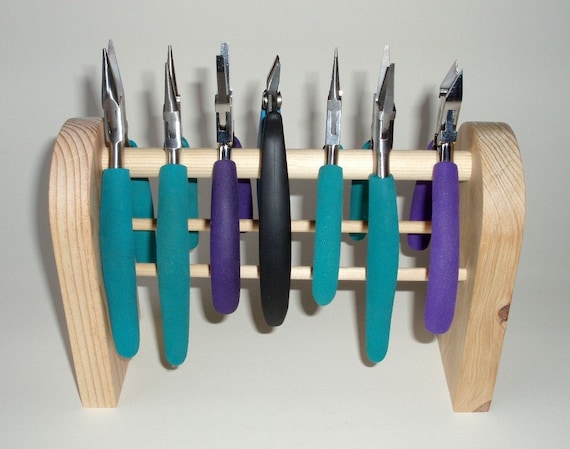
However I do keep adding to my plier collection and unfortunately, my little jar was getting too small to fit any more pliers in. I've seen loads of plier stands for sale like this on on the left but I was reluctant to spend any money when, I reasoned, I could make my own.
There was a slight problem with making my own. The afore-mentioned living in a 1-bedroom apartment and not possessing woodworking tools. However, when I saw stands more in this style I knew how I could make my own.
Not having woodworking tools isn't a problem when you can use card. I used mountboard (I believe its called mat board or matting in the US) to make sure it was thick and sturdy enough card.
However I do keep adding to my plier collection and unfortunately, my little jar was getting too small to fit any more pliers in. I've seen loads of plier stands for sale like this on on the left but I was reluctant to spend any money when, I reasoned, I could make my own.
![]() |
| Wooden plier stand from Plane N Grain |
There was a slight problem with making my own. The afore-mentioned living in a 1-bedroom apartment and not possessing woodworking tools. However, when I saw stands more in this style I knew how I could make my own.
Not having woodworking tools isn't a problem when you can use card. I used mountboard (I believe its called mat board or matting in the US) to make sure it was thick and sturdy enough card.
- Start by cutting a rectangle from the card. I made mine 10 1/2 inches by 8 inches. If you have loads of pliers you might want to make yours longer than 8 inches.
- Mark horizontal lines at 4 inches and 8 inches, creating 3 boxes 4x8, 4x8 and 2.5x8 inches.
- Score along the lines you marked
- Fold into a pyramid shape and tape or glue the sides together
- Paint or cover with colourful paper to decorate. Handmade style paper works well because it is very porous and flexible so will absorb the glue well and fold into the corners easily.
![]() |
| Finished Plier Stand |
I didn't stop with just a plier stand. I also made matching pen pots and the notecard box I mentioned in my last post. The pen pots are just empty Pringles containers, cut to the right height and covered. The notecard box is an old iphone box which just happened to be the perfect size.
![]() |
| My family of matching desk organisers |
Monday, 17 January 2011
How to: get your head around the USPS shipping options
I decided today to find out exactly what my options are for mailing items via USPS. Its not the first time I have researched it but my previous attempt involved looking at the information online and then going into a post office and being told that I could ship my items first class when I had thought I couldn't! I'm not sure if this is knowledge that Americans pick up as they grow up or if they, too have to spend time researching it. Anyway...
I mailed several items in December and had a different experience with each. The first was the kind gentleman who told me my package was fine for first class after I had assumed first class was for envelopes and not packages. The second involved 2 guys who told me my envelope was unsuitable via series of very confusing conversations. They proceded to sell me a new envelope which I would have been fine with. However when I attempted to clarify, before I left, exactly what was wrong with my envelope I was told 'nothing'. This left me even more confused and convinced that I had just been ripped off. My final experience went smoothly although the lady asked me to make sure that next time my envelope was big enough to fit the insurance sticker onto.
Before I attempt to kick start my shop for the new year I figured I should sort out the envelope issue, work out exactly what I need and find a supplier for postage materials so I can calculate exactly how much packaging will cost for each of my items.
I found out (when I googled for envelope) that USPS provides free packaging materials (boxes, envelopes and padded envelopes) for their Priority Mail Flat Rate service. This is what prompted me to take another look into all the shipping options so I could decide if that was worth it. Having got a printer recently I also wanted to familiarise myself with the service allowing you to print shipping labels from home.
My results:

First Class Mail
Parcel Post
I mailed several items in December and had a different experience with each. The first was the kind gentleman who told me my package was fine for first class after I had assumed first class was for envelopes and not packages. The second involved 2 guys who told me my envelope was unsuitable via series of very confusing conversations. They proceded to sell me a new envelope which I would have been fine with. However when I attempted to clarify, before I left, exactly what was wrong with my envelope I was told 'nothing'. This left me even more confused and convinced that I had just been ripped off. My final experience went smoothly although the lady asked me to make sure that next time my envelope was big enough to fit the insurance sticker onto.Before I attempt to kick start my shop for the new year I figured I should sort out the envelope issue, work out exactly what I need and find a supplier for postage materials so I can calculate exactly how much packaging will cost for each of my items.
I found out (when I googled for envelope) that USPS provides free packaging materials (boxes, envelopes and padded envelopes) for their Priority Mail Flat Rate service. This is what prompted me to take another look into all the shipping options so I could decide if that was worth it. Having got a printer recently I also wanted to familiarise myself with the service allowing you to print shipping labels from home.
My results:

First Class Mail
- Letters and small packages under 13ounces
- Extra services, such as insurance, available
- Price varies depending on destination and weight (and possibly size too)
- A 2oz package shipping from CA to MA will cost $1.39
- Must purchase own packaging materials
- Cannot print online shipping labels - must go to post office
Priority Mail
- Packages under 70 pounds
- Extra services, such as insurance, available
- Fixed price - whatever you can fit into the Priority Mail box/envelope of your choice ships for the price associated with that box/envelope. They also have a zone-based option which I did not investigate
- A padded envelope will ship for $4.95
- Packaging materials provided free and can be mail ordered
- Can print (and pay for) shipping labels online
Parcel Post
- Packages under 70 pounds and less than 130 inches at longest point
- Extra services, such as insurance, available
- Ground Mail only
- A 2oz package from CA to MA will cost $4.90
- Must purchase own packaging materials
- Cannot print online shipping labels - must go to post office
In conclusion, if your items are less than 13oz, first class mail is absolutely the way to go. If your items are above 10oz priority mail may be best depending on the cost of your envelopes or boxes. A 10oz item from CA to MA ships for $2.75 so if your packaging costs more than $1.95 a flat rate padded envelope will work out cheaper. If you don't live near a post office then it may also be worth paying the extra for priority mail for the convenience. Priority mail claims items will arrive in 2-3 days, I have not noticed first class items taking any longer than that.
If you have heavier items or require other options, such as holding an item at the destination post office for the customer to collect it, then you may need to research for yourself which service would work best for you.
As yet I have not looked into international postage options, look out for another blog post on that sometime in the future. Oh and let me know in the comments if I have missed out a service that may work for me :)
Sunday, 27 June 2010
How to: take great photos of jewelry
First of all I have to warn you that I can't give you all the answers on this! All I can do is to share my learning experience with you in the hope that there is something in it that might help you too.
To be a successful online seller you need skills in so many more areas besides making or finding great products to sell. Photography is one those skills and one of the most important ones too! If you are lucky you may have a friend who is a great photographer and willing to take your pictures for you or if you make a lot of money you can pay a professional to do it for you. For the rest of us we need to do the best we can.
Camera
I'm not going to lie, you need a decent camera. Not a top-of-the-range SLR but - for jewelry and other small things at least - one that has a macro mode. Don't worry about megapixels, even the cheapest camera phone these days has more than enough megapixels for online photos.
The quality of the image is important, some cameras can make it look like its foggy or there was a sandstorm. However this is another one you shouldn't need to worry about - most cameras with a macro mode will be decent quality.
Why do I need a macro mode? Macro mode allows you to take real closeups of your jewelry and still stay in focus. If you try to take closeups without it you will find it focuses on the background instead of the jewelry and then your beautiful jewelry will look blurred. Macro mode also de-focuses the background so it doesn't distract the viewer from the intended focus - the jewelry.
Light
Lighting is extremely important too. Trying to take pictures in artificial light leads to a yellow tinge to the item and the picture in general. Taking photos under a spotlight can work but tends to lead to areas which are very bright next to areas which are dark and dramatic and distracting shadows.
Whilst natural light is best, bright sunshine isn't always the best choice either as it can lead to pictures being overexposed and, again, very dramatic shadows. You can tone down direct sunlight by placing a thin white cloth in between the sun and the item to be photographed but the easiest thing to do is to find a well-lit spot that is out of the direct beam of the sun.
Background
The background you use for your pictures can have a huge impact on the way the viewer sees your items. Some aspects of choosing a background are common sense and its mostly just a case of trying different things until you find one that works with your pieces and fits with your style too.

Natural backgrounds like wood or rocks tend to work very well but you still need to be careful with the colours. I would not use a wood background for a picture of copper jewelry, for example.

A patterned background can look beautiful and add a certain style to all your pictures. Book pages are very popular or floral paper. However you should make sure that the pattern is not too bold and doesn't detract from your jewelry in any way.

A bright or contrasting background can make a bold statement and attract attention to your pieces. Just be careful it doesn't clash or alter the colour perceptions of your item. This pink background makes the turquoise beads look a different shade and presenting colours accurately online is difficult enough without complications like this!
Be very careful with a black background as it can suck the light out of your picture (left). If you use very bright light to compensate you end up with an overexposed picture instead (right).
If your black surface is reflective it can work but then you end up with a whole host of other issues!
Some items, especially earrings may work better if they are hung up rather than laid flat. Many people use a glass to hang them from with their background behind (make sure the glass is spotless!) but I find it can work well to stuff tissue paper into the glass and then hang the earrings so the direct background is the paper.
Items such as necklaces, on the other hand, may look good draped over an uneven surface such as a rock, or simply laid out in an interesting manner.
Background for crystals:
Whilst I have been happy with the quality of my pictures recently, until the other day I was still struggling to take good pictures of crystal-coloured swarovski crystals. The completely transparent nature of these beads means taking a picture of them is like trying to take a picture of a window.
I tried using a darkish background with some success but still wasn't completely happy with the focus on the beads.
Inspiration came when I was reading this blog by Angela Smith. I noticed that her photos of swarovski crystals are taken without a close background. Instead she has positioned the piece so there is nothing near to it and used the landscape behind as the background... and it works beautifully!

Of course I gave it a go, using my wall as the background and I am really pleased with the result. The focus is so much better and the space behind the piece allows more light to pass through it, accenting the facets.
Now I need to investigate with different backgrounds because I think this now looks far too grey and boring. Angela's look much nicer with the leafy green behind so I need to find somewhere nearby that I can use for the same effect! Oh and also set up a frame to hang them from.
Editing
My final section is about editing your pictures. Hopefully if you put in the effort to get the shot right to begin with, your photos will not need much editing. However there is one aspect that you will almost certainly still need to change - cropping. You don't need to pay for photoshop, there are loads of programs which will allow you to crop (and usually other simple things like changing the lighting). These days you probably even have one free with your computer. If not try the Gimp, its completely free and offers many of the same features of photoshop.
Be sure to crop your picture to remove as much of the background as possible - you want people to focus on the item you're selling.
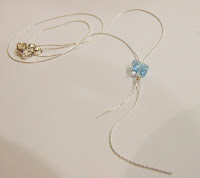
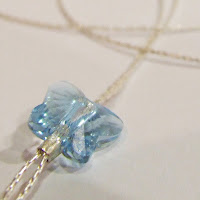
Don't be afraid to crop out parts of the item itself, especially if its large, to focus in on areas of detail or just a sample of the whole thing. The picture to the right features the entire necklace but doesn't stand out in anyway. From a distance you could be forgiven for thinking it was just an off-white square.
This picture is much more eye-catching. If you use a site like Etsy you can set the close-up, eye-grabbing picture as the main one for the item and then use the one that shows the full item as an extra for people who are interested and now want to gain an overall idea of the item.
It has taken me a while to refine my photo technique and I'm still working on it, so hopefully this will help to speed up the process for someone! If you have any great tips for taking photos of jewelry please add them to the comments below :)
To be a successful online seller you need skills in so many more areas besides making or finding great products to sell. Photography is one those skills and one of the most important ones too! If you are lucky you may have a friend who is a great photographer and willing to take your pictures for you or if you make a lot of money you can pay a professional to do it for you. For the rest of us we need to do the best we can.
Camera
I'm not going to lie, you need a decent camera. Not a top-of-the-range SLR but - for jewelry and other small things at least - one that has a macro mode. Don't worry about megapixels, even the cheapest camera phone these days has more than enough megapixels for online photos.
The quality of the image is important, some cameras can make it look like its foggy or there was a sandstorm. However this is another one you shouldn't need to worry about - most cameras with a macro mode will be decent quality.
Why do I need a macro mode? Macro mode allows you to take real closeups of your jewelry and still stay in focus. If you try to take closeups without it you will find it focuses on the background instead of the jewelry and then your beautiful jewelry will look blurred. Macro mode also de-focuses the background so it doesn't distract the viewer from the intended focus - the jewelry.
Light
Lighting is extremely important too. Trying to take pictures in artificial light leads to a yellow tinge to the item and the picture in general. Taking photos under a spotlight can work but tends to lead to areas which are very bright next to areas which are dark and dramatic and distracting shadows.
Whilst natural light is best, bright sunshine isn't always the best choice either as it can lead to pictures being overexposed and, again, very dramatic shadows. You can tone down direct sunlight by placing a thin white cloth in between the sun and the item to be photographed but the easiest thing to do is to find a well-lit spot that is out of the direct beam of the sun.
Background
The background you use for your pictures can have a huge impact on the way the viewer sees your items. Some aspects of choosing a background are common sense and its mostly just a case of trying different things until you find one that works with your pieces and fits with your style too.
Natural backgrounds like wood or rocks tend to work very well but you still need to be careful with the colours. I would not use a wood background for a picture of copper jewelry, for example.
A patterned background can look beautiful and add a certain style to all your pictures. Book pages are very popular or floral paper. However you should make sure that the pattern is not too bold and doesn't detract from your jewelry in any way.
A bright or contrasting background can make a bold statement and attract attention to your pieces. Just be careful it doesn't clash or alter the colour perceptions of your item. This pink background makes the turquoise beads look a different shade and presenting colours accurately online is difficult enough without complications like this!
Be very careful with a black background as it can suck the light out of your picture (left). If you use very bright light to compensate you end up with an overexposed picture instead (right).
If your black surface is reflective it can work but then you end up with a whole host of other issues!
Some items, especially earrings may work better if they are hung up rather than laid flat. Many people use a glass to hang them from with their background behind (make sure the glass is spotless!) but I find it can work well to stuff tissue paper into the glass and then hang the earrings so the direct background is the paper.
Items such as necklaces, on the other hand, may look good draped over an uneven surface such as a rock, or simply laid out in an interesting manner.
Background for crystals:
Whilst I have been happy with the quality of my pictures recently, until the other day I was still struggling to take good pictures of crystal-coloured swarovski crystals. The completely transparent nature of these beads means taking a picture of them is like trying to take a picture of a window.
Inspiration came when I was reading this blog by Angela Smith. I noticed that her photos of swarovski crystals are taken without a close background. Instead she has positioned the piece so there is nothing near to it and used the landscape behind as the background... and it works beautifully!
Of course I gave it a go, using my wall as the background and I am really pleased with the result. The focus is so much better and the space behind the piece allows more light to pass through it, accenting the facets.
Now I need to investigate with different backgrounds because I think this now looks far too grey and boring. Angela's look much nicer with the leafy green behind so I need to find somewhere nearby that I can use for the same effect! Oh and also set up a frame to hang them from.
Editing
My final section is about editing your pictures. Hopefully if you put in the effort to get the shot right to begin with, your photos will not need much editing. However there is one aspect that you will almost certainly still need to change - cropping. You don't need to pay for photoshop, there are loads of programs which will allow you to crop (and usually other simple things like changing the lighting). These days you probably even have one free with your computer. If not try the Gimp, its completely free and offers many of the same features of photoshop.
Be sure to crop your picture to remove as much of the background as possible - you want people to focus on the item you're selling.


Don't be afraid to crop out parts of the item itself, especially if its large, to focus in on areas of detail or just a sample of the whole thing. The picture to the right features the entire necklace but doesn't stand out in anyway. From a distance you could be forgiven for thinking it was just an off-white square.
This picture is much more eye-catching. If you use a site like Etsy you can set the close-up, eye-grabbing picture as the main one for the item and then use the one that shows the full item as an extra for people who are interested and now want to gain an overall idea of the item.
It has taken me a while to refine my photo technique and I'm still working on it, so hopefully this will help to speed up the process for someone! If you have any great tips for taking photos of jewelry please add them to the comments below :)

Saturday, 26 June 2010
How to: Make your own necklace stand
I realised the other day that signing up for craft fairs and such was all well and good... but how exactly was I going to display my items should I get accepted for one?
As usual my husband listed my budget for display equipment as "as little as possible" so I decided to have a go at making my own from materials I already had in the house or materials I could obtain for free. I spent hours browsing google images for inspiration on unique and interesting display ideas and I will be investigating quite a few more over the next few weeks. However most of those require at least some spending and/or trips to other locations so for the moment I just have one basic idea to share:
1. Start by cutting out the basic shapes from corrugated cardboard - 2 circles, one sort of egg shape and 2 strips. The sizes are entirely up to you and they don't need to be very accurate.
2. Glue the pieces together (ordinary PVA glue is fine) so they form the correct shape. You can use just one strip to hold the top to the base but using 2 makes it easier to get the angle right.
3. Papier Mache over the entire shape, taking care to keep the definition between the central circle on top and the rest of the top. You can use wallpaper paste or flour and water glue for the mache but I prefer PVA glue heavily diluted with water. At this stage ordinary newspaper is fine.
4. There are several options for the final stage depending on the finish you prefer. I quite like the rustic look and it is difficult to escape it with papier mache anyway so I chose to coat the stand in further layers of white tissue paper and leave it at that. If your jewelry is bold you may prefer to leave it with the newspaper for a more unusual finish. If you prefer a colourful stand you can always paint it or use coloured paper instead. Note that the paper must be thin to allow it to fit the contours smoothly and also so you don't get thick bumps where it overlaps.
I fitted a piece of raised wire into the top of my stand to allow me to hook earrings over it as well, to better display matching sets. I also fitted a hook into the back so necklaces longer than the stand can be gathered behind the stand. The only issue I have with this stand is that it is very lightweight meaning it is quite easy to knock over. This could easily be fixed by putting something heavy inside the upright portion before macheing over it.
The finished stand is pictured displaying my Lilac Dream Necklace and Earrings which are available from my Etsy store.
As usual my husband listed my budget for display equipment as "as little as possible" so I decided to have a go at making my own from materials I already had in the house or materials I could obtain for free. I spent hours browsing google images for inspiration on unique and interesting display ideas and I will be investigating quite a few more over the next few weeks. However most of those require at least some spending and/or trips to other locations so for the moment I just have one basic idea to share:
1. Start by cutting out the basic shapes from corrugated cardboard - 2 circles, one sort of egg shape and 2 strips. The sizes are entirely up to you and they don't need to be very accurate.
2. Glue the pieces together (ordinary PVA glue is fine) so they form the correct shape. You can use just one strip to hold the top to the base but using 2 makes it easier to get the angle right.
3. Papier Mache over the entire shape, taking care to keep the definition between the central circle on top and the rest of the top. You can use wallpaper paste or flour and water glue for the mache but I prefer PVA glue heavily diluted with water. At this stage ordinary newspaper is fine.
4. There are several options for the final stage depending on the finish you prefer. I quite like the rustic look and it is difficult to escape it with papier mache anyway so I chose to coat the stand in further layers of white tissue paper and leave it at that. If your jewelry is bold you may prefer to leave it with the newspaper for a more unusual finish. If you prefer a colourful stand you can always paint it or use coloured paper instead. Note that the paper must be thin to allow it to fit the contours smoothly and also so you don't get thick bumps where it overlaps.
I fitted a piece of raised wire into the top of my stand to allow me to hook earrings over it as well, to better display matching sets. I also fitted a hook into the back so necklaces longer than the stand can be gathered behind the stand. The only issue I have with this stand is that it is very lightweight meaning it is quite easy to knock over. This could easily be fixed by putting something heavy inside the upright portion before macheing over it.
The finished stand is pictured displaying my Lilac Dream Necklace and Earrings which are available from my Etsy store.
Labels:
Display Ideas,
Tutorials
Subscribe to:
Posts (Atom)